
Download Beepbooply – AI Text‑to‑Speech, Free & Secure
Overview
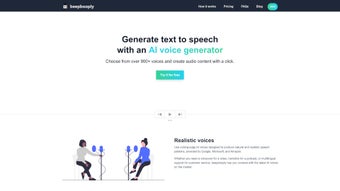
Beepbooply is a cutting‑edge, web‑based AI text‑to‑speech (TTS) platform that transforms any written content into crystal‑clear, natural‑sounding audio. Powered by deep‑learning voice synthesis, the service supports more than 80 languages and offers an impressive library of over 900 distinct voice options. Whether you are a video creator needing a quick voiceover, a podcaster looking for consistent narration, or a business building interactive voice assistants, Beepbooply scales to meet high‑volume demands while preserving quality.
The interface is designed for simplicity: pick a voice, paste or type your script, adjust pacing, pitch, volume, or speaking style, and click “Generate.” Within seconds the audio file appears, ready for playback, download, or direct embedding. A free tier grants limited daily usage, while tiered subscriptions unlock higher character limits, premium voices, and batch processing. Because it runs entirely in the browser, there is no software to install, and all data is transmitted over encrypted HTTPS connections, ensuring privacy and security for personal or commercial projects.
Beepbooply’s versatile feature set, multilingual reach, and intuitive design make it a go‑to tool for creators who need reliable, high‑quality speech synthesis without a steep learning curve.
Feature Highlights
- Multilingual Support: Over 80 languages and dialects, covering major world languages and regional accents.
- 900+ Voices: A diverse catalog ranging from classic male and female narrators to expressive characters and celebrity‑style tones.
- Customizable Speech Parameters: Fine‑tune pacing, pitch, volume, and speaking style (formal, conversational, energetic, etc.) to match the tone of your project.
- Scalable Batch Generation: Upload CSV or JSON files to generate thousands of audio files in one automated workflow.
- Real‑Time Preview: Instantly listen to a short sample before committing to the full render, saving time and bandwidth.
- Secure Cloud Processing: All audio is generated on encrypted servers; no local installation means a smaller attack surface.
- Download Options: Export audio in MP3, WAV, or OGG formats, with adjustable bitrate for optimal file size.
- Integration Ready: RESTful API and Webhooks enable developers to embed TTS directly into apps, websites, or customer‑service bots.
- Free Tier & Flexible Pricing: Start for free with limited daily characters; upgrade to pay‑as‑you‑go or subscription plans for unlimited access.
- Cross‑Platform Accessibility: Works on any modern browser, making it usable on Windows, macOS, Linux, Android, and iOS devices without additional software.
Getting Started: Installation, Usage & Compatibility
Because Beepbooply is a fully web‑based solution, there is no traditional installation process. All you need is a stable internet connection and a modern browser (Chrome, Firefox, Edge, Safari). Simply navigate to beepbooply.com, create a free account, and you’re ready to generate speech.
Step‑by‑Step Guide
- Create an Account: Click “Sign Up,” enter your email, set a password, and verify your address. The free tier provides up to 5,000 characters per day.
- Select a Voice: Browse the voice library by language, gender, or style. Hover over each entry to hear a 5‑second preview.
- Enter Your Text: Paste or type the script into the text box. The platform supports markdown formatting for pauses and emphasis.
- Adjust Settings: Use sliders to modify speed, pitch, volume, and add optional effects like breathiness or echo.
- Generate Audio: Click “Synthesize.” The system processes the request in the cloud and returns a playable waveform.
- Download or Share: Choose MP3, WAV, or OGG, then download directly or copy a shareable link.
- API Integration (Optional): For developers, generate an API key in the dashboard and follow the REST documentation to automate TTS in your applications.
Compatibility: As a browser‑based service, Beepbooply works on Windows 10/11, macOS 12+, Linux distributions with a modern desktop environment, Android 8+, and iOS 13+. No additional plugins or extensions are required.
Frequently Asked Questions
Is there a limit to the free tier?
Yes. The free plan allows up to 5,000 characters per day and access to a limited set of standard voices. Upgrading removes these caps.
Can I use Beepbooply for commercial projects?
Absolutely. All paid subscription tiers include a commercial‑use license, allowing you to embed generated audio in videos, podcasts, apps, and marketing materials.
How secure is my data?
Beepbooply uses TLS 1.3 encryption for all data in transit and stores temporary audio files on encrypted servers that are automatically purged after 24 hours unless you download them.
Do I need a powerful computer to generate speech?
No. All processing happens in the cloud, so even low‑end devices can generate high‑quality audio as long as they have an internet connection.
Is there an API, and how is it billed?
Yes. Beepbooply offers a RESTful API with pay‑as‑you‑go pricing based on characters processed. Subscription plans include a generous API quota.
Conclusion – Why Download Beepbooply Today?
Pros:
- Extensive language and voice library (80+ languages, 900+ voices).
- No software install – works in any modern browser.
- Highly customizable speech parameters for precise tonal control.
- Scalable batch processing suitable for large‑scale projects.
- Secure, encrypted cloud processing protects user data.
- Free tier available for hobbyists and early testing.
- Comprehensive API for developers and enterprises.
Cons:
- Requires a constant internet connection; offline use not supported.
- Free tier limits daily character count, which may be restrictive for power users.
- Advanced premium voices are only available on higher‑priced plans.
- Audio rendering time can increase with extremely long scripts during peak usage.
In summary, Beepbooply delivers a powerful, user‑friendly AI text‑to‑speech experience that caters to creators, marketers, and developers alike. Its vast voice catalog, real‑time preview, and flexible pricing make it a standout option in a crowded market. Whether you need a single narration for a YouTube video or thousands of audio snippets for an e‑learning platform, Beepbooply scales effortlessly while maintaining natural‑sounding results. The combination of a free entry point and robust paid plans ensures you can start experimenting immediately and grow with the service as your audio needs expand.
Ready to give your words a voice? Sign up for Beepbooply now, generate your first audio file for free, and discover how effortless high‑quality TTS can be.



.png)



